ZenMaid is the only major scheduling platform built exclusively for maid services. That matters more than it sounds. Every feature — from the way it handles bi-weekly recurring cleans to the online booking form — was designed for how residential cleaning businesses actually work, not retrofitted from a generic field service tool. It scores a 4.7/5 on Capterra from over 200 verified reviews, which is unusually high for scheduling software.
This review covers who ZenMaid is right for (solo and small maid services), who should skip it (GPS-dependent teams and multi-trade operations), and exactly what it costs when you do the per-seat math.
This article contains affiliate links. If you sign up through our links, we may earn a commission at no extra cost to you. We only recommend tools we’d use ourselves.
What ZenMaid Actually Does
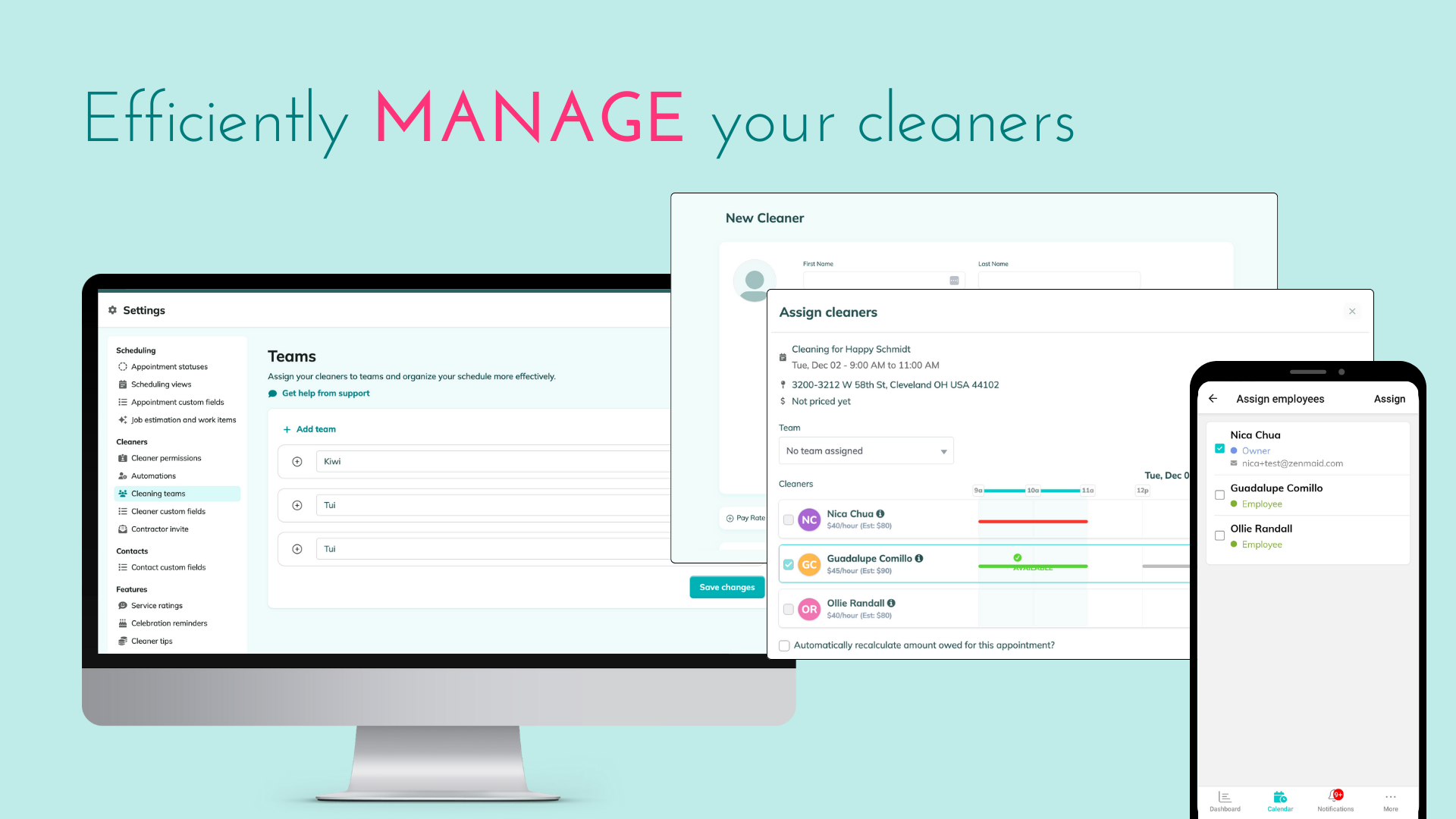
At its core, ZenMaid handles three things: scheduling recurring cleaning jobs, dispatching cleaners, and collecting payment. But the way it does each of those things is tailored to maid service workflows in a way that Jobber and Housecall Pro aren’t.
Here’s what you get:
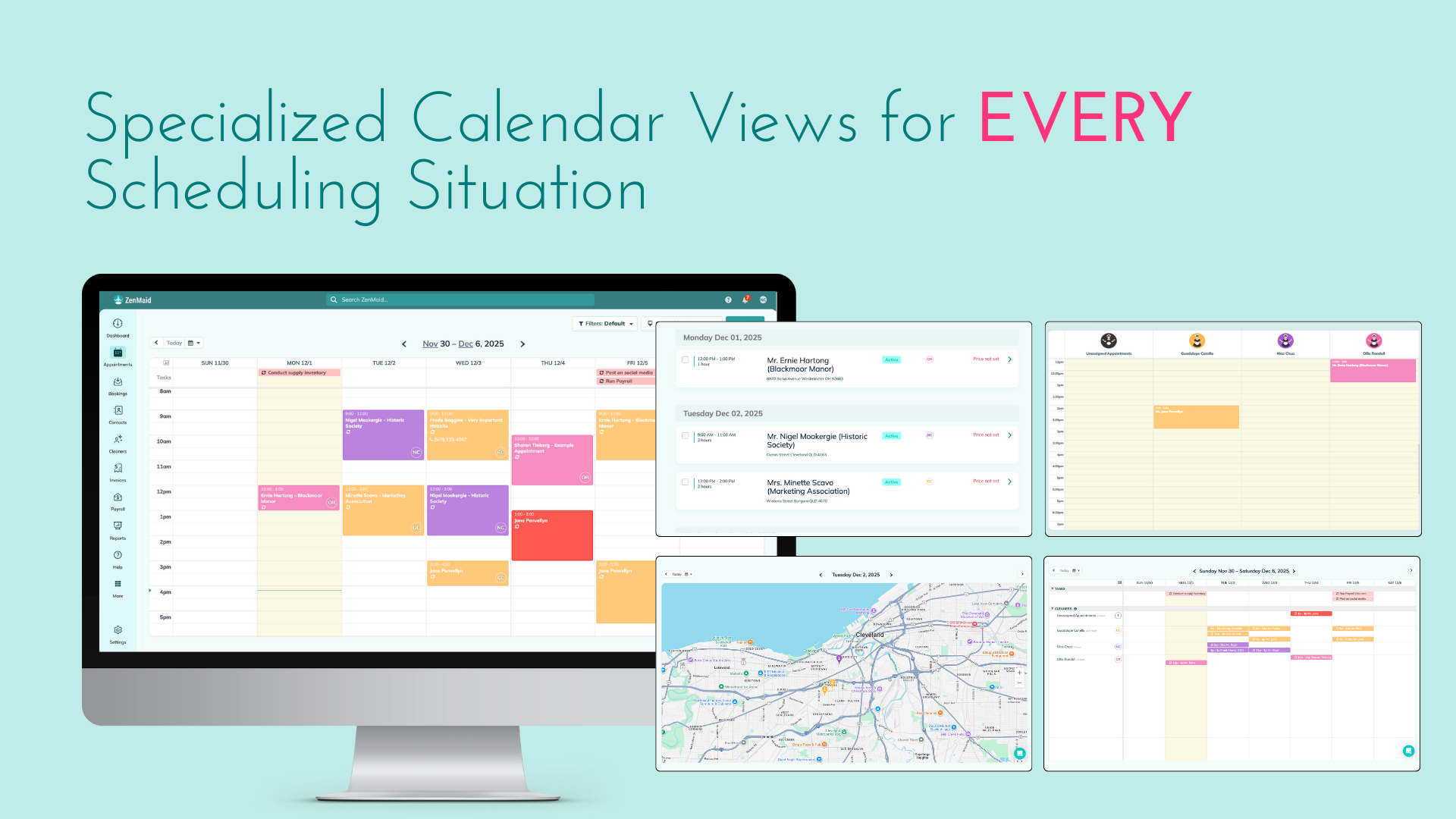
- Drag-and-drop scheduling calendar with built-in support for weekly, bi-weekly, and monthly recurring cleans. Rescheduling a client takes about five seconds.
- Automated SMS and email reminders sent to both your clients and your cleaners before every appointment. Set it up once and it fires automatically — this alone cuts no-shows significantly.
- Online booking form where clients select their home size, cleaning frequency, and preferred date. No back-and-forth texts. No phone tag. The booking creates a job in your calendar automatically.
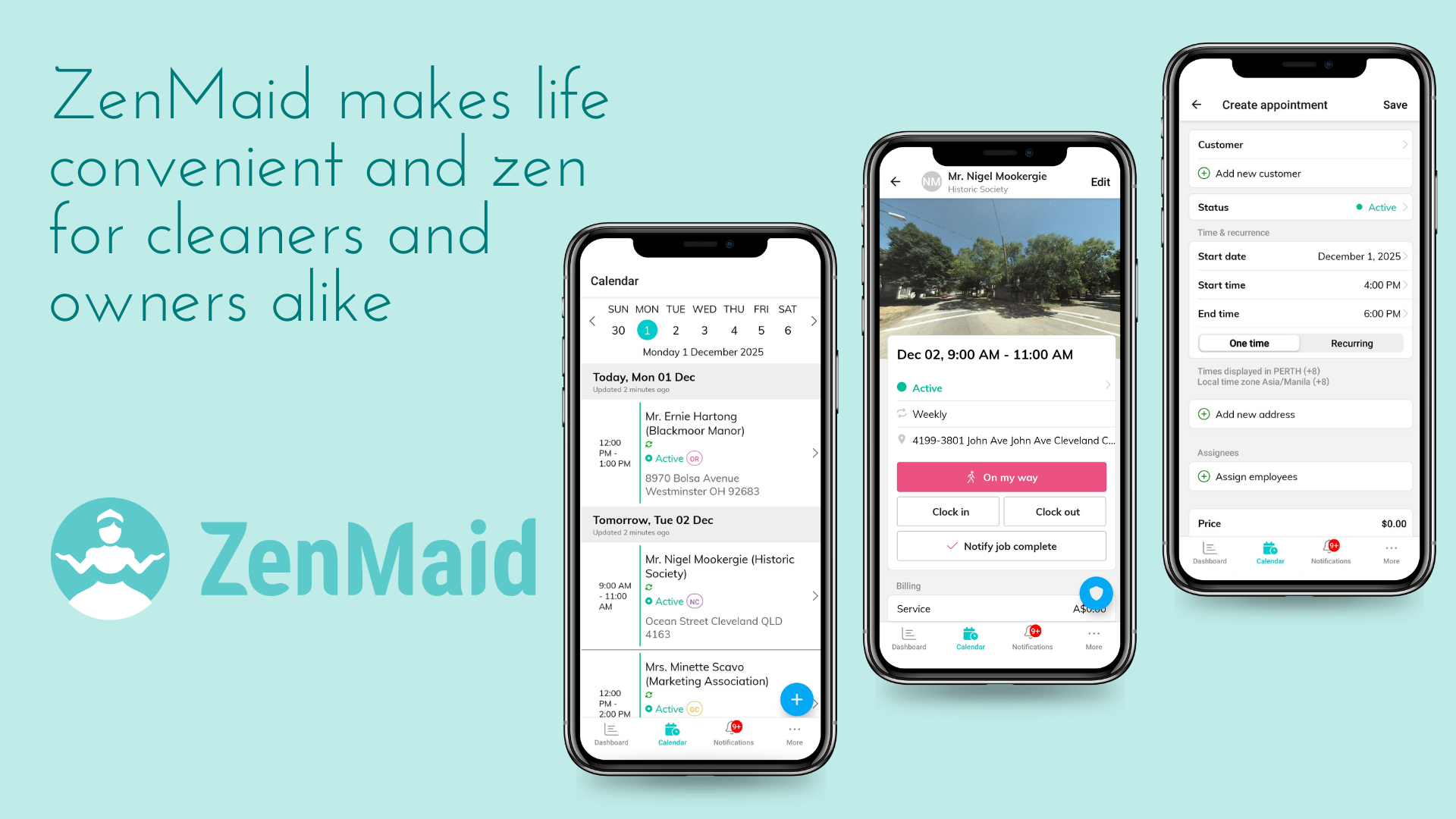
- Mobile app for cleaners (iOS and Android) showing their daily schedule, client notes, and allowing check-in/check-out. Your cleaners see exactly where they’re going and what the client expects before they walk in the door.
- Invoicing and Stripe payment processing built in, so clients can pay immediately after a clean. The invoice generates automatically when a job is marked complete.
The difference between ZenMaid and a generic tool like Jobber is subtle but real. When you create a new client in ZenMaid, it asks about home size, number of bedrooms, cleaning frequency, and special instructions — the exact things a maid service needs to know. Generic FSM tools ask about “job type” and “service category” because they’re built for plumbers and HVAC techs too.
Beyond the software itself, ZenMaid has something no competitor matches: a genuine community. The Mastermind Facebook group has over 10,000 maid service owners sharing advice, and their “Filthy Rich Cleaners” podcast covers the real operational side of running a cleaning business. These aren’t marketing gimmicks — they’re places where owners actually help each other solve problems like pricing, hiring, and client retention.
ZenMaid Pricing — The Real Numbers
This is where you need to pay attention. ZenMaid’s base prices look affordable, but the per-seat fees add up once you’re hiring. Here’s the full breakdown as of March 2026, per their pricing page:
Starter: $19/month + $4 per additional seat One user included. Capped at 40 appointments per month. Includes online booking, SMS reminders, and basic reports. This works for solo cleaners doing roughly 10 recurring clients.
Pro: $39/month + $14 per additional seat Unlimited appointments. Multiple cleaners. QuickBooks sync. Priority support. Custom booking forms. This is the plan most small teams land on.
Pro Max: $49/month + $24 per additional seat Everything in Pro plus advanced reporting and a dedicated account manager. Worth it only if you’re running 8+ cleaners and need the reporting depth.
One thing to note: ZenMaid only offers monthly billing. There’s no annual discount, which is unusual for SaaS tools in this space. Jobber and Housecall Pro both offer lower rates if you pay annually.
The Per-Seat Math (Don’t Skip This)
The base price is just the starting point. Here’s what Pro actually costs as you grow:
| Team Size | Monthly Cost (Pro) |
|---|---|
| Solo (1 cleaner) | $39/month |
| 2 cleaners | $53/month ($39 + $14) |
| 3 cleaners | $67/month ($39 + $28) |
| 4 cleaners | $81/month ($39 + $42) |
| 5 cleaners | $95/month ($39 + $56) |
Cost Alert: At 5 cleaners, ZenMaid Pro runs $95/month. For comparison, Jobber Connect costs $119/month for up to 5 users with GPS tracking included. FieldVibe is free for solo cleaners. Run your own math before committing.
Who the Starter Plan Is NOT For
The 40-appointment cap sounds like plenty until you do the math. If you have 15 bi-weekly clients, that’s 30 appointments per month — you’re already at 75% capacity. Add a few one-time deep cleans or move-out cleans and you’ll hit the ceiling by month three. If you’re past 10 recurring clients, go straight to Pro.
Scheduling — Where ZenMaid Shines
The scheduling calendar is the heart of ZenMaid, and it’s where the maid-service-specific design really shows. Generic scheduling tools treat every job as a one-off. ZenMaid understands that residential cleaning is built around recurring patterns — and that’s a fundamental difference in how the calendar works.
You can set a client to bi-weekly on Tuesdays, and ZenMaid populates every future appointment automatically. Need to swap a cleaner? Drag the job to someone else’s column. The cleaner availability view shows you who’s free on what day without cross-referencing multiple calendars or texting your team.
When a client calls to reschedule, you can move their appointment in seconds and both the client and the assigned cleaner get notified automatically. No manual texts. No forgotten updates. This is the kind of small detail that saves 30 minutes a day when you’re managing 20+ recurring clients.
The automated reminders are the feature that pays for itself fastest. Configure them once — say, 24 hours before each clean — and every client and cleaner gets notified automatically. According to Software Advice, users consistently cite this as the feature that saves them the most time. ZenMaid also sends automatic follow-ups after appointments to collect feedback and request referrals.
What it’s missing: no GPS tracking to see where your cleaners are between jobs, and no route optimization. If you run three or more crews across a metro area, this gap matters. You won’t know if a cleaner is running behind until they tell you.
Online Booking — A Real Time-Saver
If you’re still booking clients through text messages and phone calls, this feature alone might justify ZenMaid’s monthly cost. The online booking form is fully customizable — you set your services, add-ons, home sizes, and frequencies. Clients fill it out, pick a date, and ZenMaid creates the job in your schedule with zero manual entry.
You can embed the form on your website or share it as a standalone link. Even if you don’t have a full website yet, the booking link works on its own. Share it on your Facebook page, in your Instagram bio, or in your Google Business Profile.
The form also handles the quoting part. You set your prices by home size and frequency (for example, $150 for a 3-bedroom standard clean, $120 if they book bi-weekly), and the client sees the price before they confirm. No awkward pricing conversations over the phone.
Quick Tip: Add your ZenMaid booking link to your Google Business Profile. Clients who find you on Google Maps can book a cleaning without ever making a phone call. This alone can bring in 2-3 extra bookings per month.
Where ZenMaid Falls Short
No software is perfect. Here’s what frustrated users mention most, based on Capterra reviews and real owner feedback:
No GPS tracking. If you have 3+ cleaners out in the field, you can’t see where they are in real time. You’re relying on check-in timestamps and trust. Jobber solves this with built-in GPS tracking on every plan.
Per-seat pricing compounds. Five cleaners on Pro costs $95/month. That’s not outrageous, but it adds up — especially when you’re also paying for supplies, insurance, and gas. And on Pro Max, five cleaners would run you $145/month.
40-appointment cap on Starter is tight. A solo cleaner with 15 bi-weekly clients will bump into this within three months. ZenMaid doesn’t let you buy extra appointments without upgrading to Pro.
No phone support. Email and chat only. This frustrates owners during initial setup when questions come fast. As one Capterra reviewer noted, “You can’t get to talk to someone over the phone if I need help.” ZenMaid’s chat support is responsive, but sometimes you just want to call someone.
Limited reporting. You get basic revenue totals and job counts. No advanced analytics, no employee performance tracking, no profit-per-job breakdowns. If you want real reporting, you’ll need to export to QuickBooks or a spreadsheet.
No open API. You can’t build custom integrations. Your only option for connecting ZenMaid to other tools is through Zapier, which adds both cost and complexity. If you rely on tools outside the QuickBooks/Stripe ecosystem, this could be a dealbreaker.
Is ZenMaid Worth It?
For solo cleaners and small maid services: yes. Here’s the honest breakdown by team size:
Solo cleaner (1 person): The Starter plan at $19/month costs less than a single cleaning job. If it saves you an hour of scheduling per week — and it will — that’s worth it from day one. The online booking form alone eliminates the back-and-forth texting that eats into your evenings.
Small team (2-4 cleaners): Still a strong recommendation for residential-only businesses. Pro at $53-$81/month is reasonable for the time savings on scheduling, reminders, and invoicing. But run the per-seat math first and compare it against your actual scheduling headaches.
Growing team (5-8 cleaners): ZenMaid still works, but you’re approaching the point where GPS tracking and advanced reporting start to matter. Compare the total cost against Jobber Connect at $119/month for 5 users, which includes GPS and better analytics.
Large operation (8+ cleaners): Look at Jobber or Housecall Pro first. ZenMaid’s per-seat pricing makes less sense at scale, and you’ll likely need the routing, GPS, and reporting features it doesn’t offer.
The 4.7/5 Capterra score from 200+ reviews speaks for itself — users genuinely like ZenMaid, especially the maid-service-specific workflows that you won’t find in generic field service tools. You just need to make sure you’re in the right team size range.
Try ZenMaid Free for 14 Days — no credit card required.
Alternatives to Consider
ZenMaid isn’t the only option. Here’s when to look elsewhere:
FieldVibe (free): If you’re truly on zero budget and cleaning solo, start here. Free scheduling, reminders, and time tracking. No invoicing, no online booking — but you can’t beat the price. Read our FieldVibe review for the full breakdown.
Jobber ($39-$199/month): Better GPS tracking, better reporting, and built for businesses that do multiple service types (cleaning plus carpet cleaning, pressure washing, etc.). Steeper learning curve and higher cost, but more room to grow into. Capterra rates it 4.5/5 from thousands of reviews. If you’re comparing the two side-by-side, read our ZenMaid vs. Jobber comparison.
Housecall Pro ($59-$299/month): Built-in marketing tools and automated review requests set it apart. Makes the most sense once you’re past 15 regular clients and want to grow through online reputation. Overkill if you’re just starting out.
For a full breakdown of all the options, check out our best cleaning business software guide.
If GPS tracking and multi-trade support matter more to you than cleaning-specific workflows, Jobber is worth a look:
Pricing Breakdown
- 1 user included
- Up to 40 appointments/month
- Online booking form
- SMS reminders
- Basic reports
- Unlimited appointments
- Multiple cleaners
- QuickBooks sync
- Priority support
- Custom booking forms
- Everything in Pro
- Advanced reporting
- Dedicated account manager
Best For / Who Should Skip It
Best For: Solo cleaners and small maid services (1–8 cleaners) who want software that understands residential cleaning workflows. If you're starting out or running a residential-only service, this is the best fit.
Who Should Skip It: Business owners who need GPS team tracking, plan to expand into other service trades, or manage 10+ cleaners with complex routing. Those operators should look at Jobber.
Alternatives Worth Considering
Jobber
Best for growing teams with multiple service types or GPS tracking needs
Housecall Pro
Best for built-in marketing automation and review management